

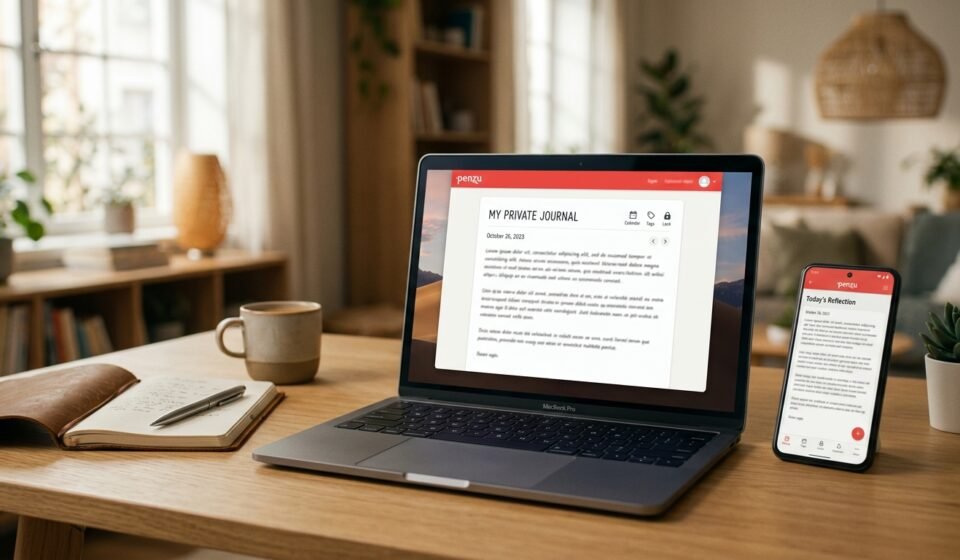

Keeping a personal journal used to mean carrying a notebook everywhere and hoping nobody opened it. Today, digital journaling offers a different approach: your thoughts can be searchable, synchronized across devices, and protected with account and journal-level security. Penzu is one of the long-running services built around that idea.
Penzu describes itself as a private, customizable online journal and says the service has been available since 2008, with more than 2 million journalers around the world. Its current platform works through a web browser as well as iOS and Android apps, and it is designed for everything from everyday reflections to dream, travel, food, pregnancy, and other specialized journals.
But what does Penzu actually offer in 2026? How private is it? What can you do for free, and what requires a subscription? And what should long-term users know about exporting and protecting their writing?
This guide answers those questions using current first-party information, app listings, recent software coverage, and independent user discussions.
What Is Penzu?
Penzu is a digital journaling platform focused primarily on private diary and journal writing. Instead of treating journaling as a general-purpose notes feature, the service is organized around dated entries, journals, reminders, customization, searching, and privacy controls.
According to Penzu’s official history, founder Alexander Mimran started the service after wanting a more secure place to keep personal thoughts online. The company says the name was influenced partly by the Latin word pensare, associated with thinking or being full of thought. Penzu also says users in more than 170 countries have used the service.
The service has evolved beyond its original web-based concept. The current Penzu website supports browser-based journaling, while dedicated mobile apps are available for iOS and Android. The company also emphasizes automatic saving, reminders, search, tagging, entry sharing, and journal customization as core parts of the experience.
That makes Penzu more than a simple blank text box. It is structured specifically around building a personal archive that you can continue using over time.
How Penzu Works
Getting started is relatively straightforward. Penzu’s current signup page asks users to create an account with basic registration information and a password. Once an account is created, the user can start writing in the journal environment.
The basic concept is simple:
You create a journal, add entries, and return to those entries later. Penzu says it saves as you type, which is intended to reduce the risk of losing work during normal use.
The platform is also designed for different journaling styles. Someone might maintain a traditional daily diary, while another person could use it as a dream journal, food diary, travel journal, work journal, or reflective journal. Penzu explicitly promotes these different use cases on its website.
The flexibility is useful because not every journal needs to be written in exactly the same way. A daily diary might contain a few paragraphs, while a travel journal could include photos and longer descriptions.
Key Penzu Features
One of the clearest strengths of Penzu is that its feature set is centered on journaling rather than general note-taking.
Penzu’s free Basic plan currently includes unlimited entries, mobile apps, basic journal covers and fonts, and simple writing reminders. The company also promotes autosave and access across devices as part of its platform.
For organization, the service offers tools such as search and, on paid plans, entry tagging. This becomes increasingly important once someone has accumulated hundreds or thousands of entries. Finding an old journal entry is much easier when the service provides structured search and organization tools instead of forcing users to scroll through one enormous document.
Customization is another notable feature. Paid plans add custom covers, fonts, colors, page themes, and other visual options. These features are mostly about making a digital journal feel personal rather than looking like a generic notes application.
Penzu also provides writing prompts and reminders. The reminders can help people who like journaling but struggle to maintain a routine. The company supports daily, weekly, or custom reminder schedules.
For people who want to preserve their writing outside the platform, PDF export is available to Pro and Pro+ customers. Penzu’s current help documentation says users can export individual entries, selected entries, or an entire journal as a PDF from the full website.
Another unusual feature is Penzu Post. Pro and Pro+ subscribers can create journal entries by email, with the email subject becoming the entry title and the body becoming the entry content. Supported image attachments can also be imported into entries.
Is Penzu Free?

Yes. Penzu currently offers a free Basic plan, and the company explicitly states that the service is always free at the Basic level. The free plan includes unlimited entries, mobile apps, basic customization, and simple reminders.
The paid structure is divided into Pro and Pro+.
Penzu Pro is currently listed at $19.99 per year. It adds features including encryption locking, custom journal covers and fonts, entry tagging, PDF export, writing prompts, and Penzu Post.
Penzu Pro+ is listed at $49.99 per year. In addition to Pro features, it includes premium handwritten fonts, fullscreen Zen mode, versions and entry recovery, premium support, and stronger encryption-locking functionality described by Penzu as military-grade encryption.
Penzu also currently lists a Pro+ Lifetime option for a one-time $199.99 payment.
The mobile app listings show slightly different ways of presenting subscriptions. Apple’s current U.S. App Store listing shows a free download with in-app purchases and lists Pro at $4.99 per month or $19.99 per year. The Google Play listing likewise shows a free app and states that Pro costs $4.99 monthly or $19.99 annually.
Because subscription pricing can vary by platform, region, taxes, promotions, or billing method, users should check the price displayed at the time they subscribe.
How Private Is Penzu?
Privacy is central to Penzu’s product design, but it is useful to distinguish ordinary journal locking from encryption.
Penzu says its privacy approach includes password protection and encryption. Its current help documentation explains that a journal password is separate from the password used to sign into the Penzu account, giving an individual journal another layer of protection.
Basic Locking lets users protect a journal with a separate password and optionally use an auto-lock function. However, encrypted journal locking is a paid feature. Penzu says Encryption Lock encrypts journal entries using the journal password.
There is an important trade-off here. Penzu states that if the password for an Encryption-Locked journal is lost, the journal cannot be unlocked and its contents cannot be recovered. Unlike Basic Locking, the encryption password cannot simply be reset through the normal forgotten-password process.
This is an important distinction for anyone storing years of personal writing. A stronger privacy mechanism can also make account recovery more difficult.
Penzu’s current homepage describes its privacy system using terms such as double password protection and encryption, while the detailed help documentation explains how the different locking modes actually work.
The Android listing also states that data is encrypted in transit and that users can request deletion of their data. Google Play’s developer-provided safety information says the app does not share data with third parties, while noting that the app may collect personal information, photos and videos, and other categories of data.
Apple’s App Store privacy disclosure, meanwhile, says the developer indicates that identifiers and usage data may be used for tracking across apps and websites owned by other companies and that contact information and identifiers may be linked to users for purposes such as advertising or analytics. Apple also notes that this developer-provided privacy information has not been verified by Apple.
These disclosures illustrate why “private journal” and “completely inaccessible to the provider” should not automatically be treated as identical claims. Users should review the platform’s current privacy documentation and app-store disclosures based on the type of information they intend to store.
Penzu on Phones and Computers
Cross-device access is one of Penzu’s core selling points.
The official website says users can write through a web browser or use custom-built applications for iOS and Android. Penzu also describes the desktop experience as particularly suitable for long-form writing while the mobile apps are intended to let users continue writing or reading when away from a computer.
The current Google Play listing shows that the Android app was updated on August 28, 2026. It also lists more than 500,000 downloads and a 4.2-star rating from more than 10,000 reviews on Google Play at the time of the current listing.
The U.S. App Store listing currently shows a 4.2 rating from approximately 2,500 ratings.
These ratings represent user feedback on the respective stores, not an independent technical evaluation of the service.
Backups and Exporting Matter
For a journal that may contain years of memories, exportability deserves as much attention as writing features.
Penzu’s current documentation confirms that PDF export is available to Pro and Pro+ users through the full website. A user can export one entry, a selection of entries, or an entire journal.
There are also specific recovery procedures for mobile synchronization issues. Penzu’s August 2026 documentation describes a process for recovering unsynced iOS entries by exporting their text before resetting local app storage. It warns users not to sign out, reinstall, or wipe local storage before confirming that important entries have synchronized to the website. It also notes that the iOS text export does not preserve photos.
Penzu’s own support documentation therefore makes an important practical point clear: a cloud-based journal should not necessarily be treated as the only copy of irreplaceable information.
Independent user discussions reinforce the reason for being cautious, although these reports are anecdotal rather than formal evidence of a platform-wide problem. In 2025 and 2026, some Reddit users described concerns involving synchronization, missing text, or difficulties preserving older Penzu journals. Other users reported normal use.
The practical lesson is broader than Penzu itself: important digital records are safer when the owner maintains an independent copy.
What Happens If You Downgrade From Penzu Pro?

This is one of the less obvious details users should know before subscribing.
Penzu’s help documentation, updated in August 2026, explains that downgrading from Pro or Pro+ to Basic can change the structure and availability of premium content. Most importantly, encryption-locked journals are deleted during the downgrade and cannot be recovered.
Other changes can include merging entries from additional non-encrypted journals into the single journal supported by Basic, removing paid themes, and making paid organizational features such as tags, Trash, and Versions unavailable.
That means subscribers should understand the difference between cancelling automatic renewal and immediately downgrading. Penzu specifically advises that someone who only wants to stop the next charge can turn off automatic renewal while keeping paid features until the current subscription expires.
For a long-term journal, these rules are worth reading before changing plans.
Can You Share Penzu Journal Entries?
Penzu is private by design, but it is not completely isolated from sharing.
Its current support documentation says users can share individual entries through private email or a public link. Both methods are read-only, and Penzu does not provide full-journal sharing or collaborative editing.
A public-link share can be viewed without a Penzu account, while later changes to the original entry appear through the same link. Penzu also provides a method for disabling a generated public link.
This can be useful when a journal entry is something you want to show another person without opening your entire diary.
Penzu vs. Other Digital Journaling Options
The current journaling market has expanded considerably. Recent coverage from Zapier focuses on services such as Day One, Diarium, Apple Journal, Grid Diary, and Dabble Me, highlighting differences in platform support, reminders, exporting, pricing, and media features.
AlternativeTo lists more than 100 alternatives to Penzu across different platforms, including options such as Cryptee, Day One, Trilium Notes, and others.
The important distinction is not simply which app has the longest feature list. It is what kind of journaling workflow you want.
Someone focused on browser-based private diary writing may prioritize journal locking and a simple writing environment. Another person may care more about advanced mobile applications, multimedia, offline access, stronger export formats, mood tracking, integrations, or specialized productivity tools.
Recent 2026 competitor coverage also shows that expectations for journaling software increasingly include mobile-first workflows, more sophisticated organization, and additional forms of reflection beyond basic text entry.
Penzu’s main identity remains much closer to the traditional private digital diary.
Who Might Find Penzu Useful?
Penzu can make sense for people who want a straightforward digital place to write regularly without building their journal from scratch in a general-purpose notes application.
It can be used for everyday diary entries, reflective writing, dreams, travel memories, food tracking, work journaling, and other personal records. The combination of reminders, search, mobile access, customization, and dedicated journal features makes it suitable for ongoing use.
It can also appeal to people who prefer typing to handwriting. A computer keyboard can make long entries much faster, while the phone apps allow the same account to be used away from a desk.
At the same time, people keeping highly sensitive or irreplaceable information should pay close attention to password management, encryption-lock behavior, export options, and independent backups.
Frequently Asked Questions About Penzu
Is Penzu still available in 2026?
Yes. Penzu’s main website and mobile applications are currently active. Its Google Play listing shows an August 28, 2026 update, while the official support site continues to publish current help documentation.
Is Penzu free to use?
Yes. Penzu has a free Basic plan with unlimited entries, mobile apps, basic customization, and simple reminders. Additional features are included in Pro and Pro+ subscriptions.
Does Penzu have a mobile app?
Yes. Penzu offers iOS and Android apps in addition to its web-based journal platform.
Can you export Penzu entries?
Yes, but the current PDF export feature is available to Pro and Pro+ customers on the full website. Users can export individual entries, selected entries, or entire journals.
What happens if you forget an encryption password?
Penzu states that an Encryption-Locked journal cannot be unlocked or recovered if its encryption password is forgotten.
Is Penzu suitable for long-term journaling?
It can be, particularly for users who value a dedicated journal environment, but long-term users should maintain independent backups of important writing. Penzu provides export and recovery tools, while its documentation also highlights situations where unsynchronized mobile data can require special recovery steps.
Final Thoughts on Penzu
Penzu occupies a distinct place in the digital journaling space. It has been built specifically around private diary writing since 2008, and its current platform continues to combine a browser-based journal with mobile apps, reminders, customization, search, sharing, and different levels of journal protection.
Its free plan makes basic journaling accessible, while Pro and Pro+ add features for users who want more customization, encryption controls, exports, organization, and recovery tools.
The most important consideration for serious journalers is not simply how attractive an app looks. It is how the service handles privacy, passwords, synchronization, exports, and plan changes. Penzu’s current support documentation provides clear information on each of those areas, including some consequences that are easy to overlook, such as the treatment of encryption-locked journals during a downgrade.
For anyone considering Penzu in 2026, understanding those details before filling the service with years of personal writing is just as important as choosing a place to begin journaling.